

Apple released iOS 26.1 beta 4 today, introducing a significant shift in design philosophy: user control over the Liquid Glass interface.
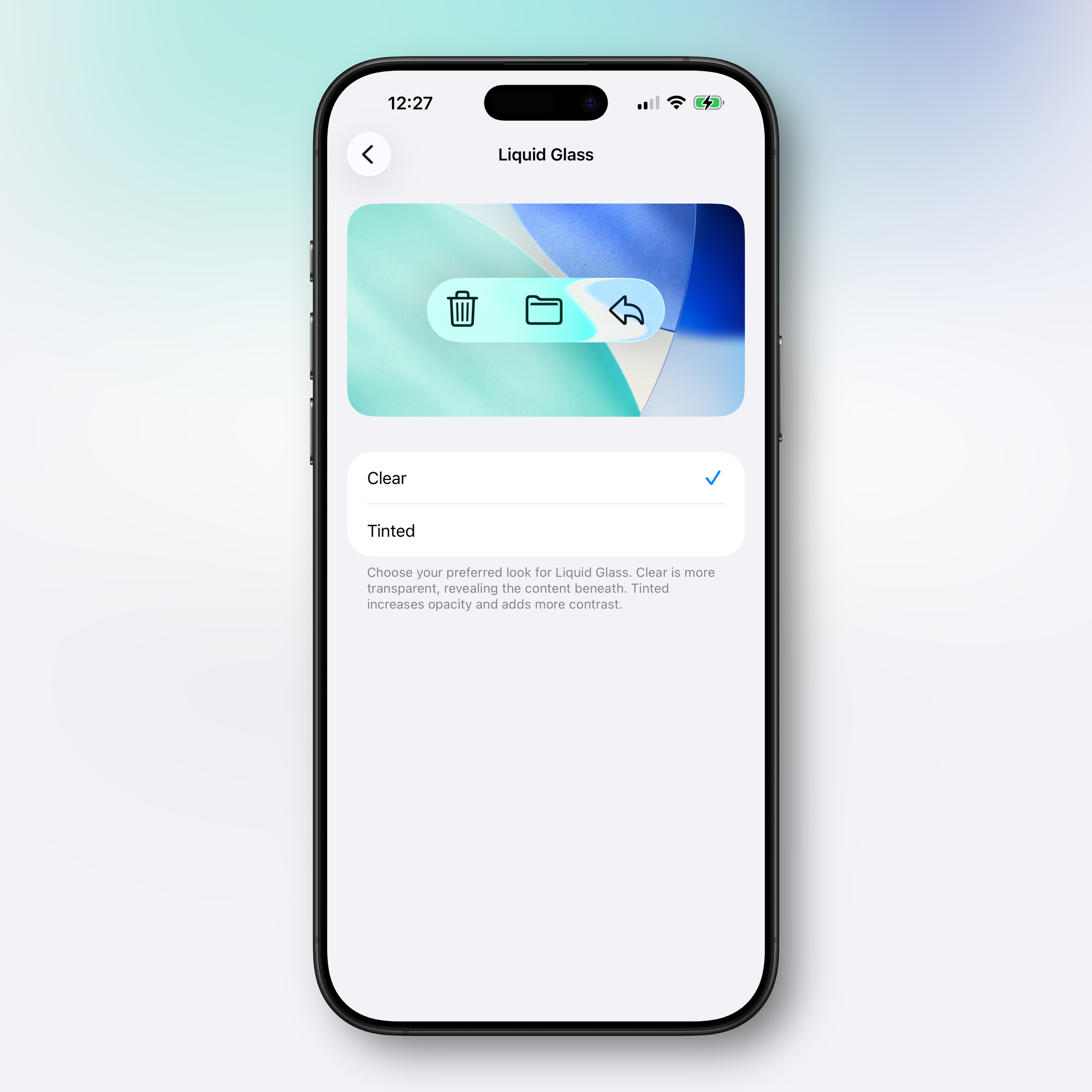
The Headline Feature: Liquid Glass Toggle
The fourth beta adds a new setting allowing users to choose between two Liquid Glass appearances: Clear or Tinted. Clear maintains the transparent design introduced with iOS 26, showing content beneath interface elements. Tinted increases opacity and adds contrast throughout the system.
This marks a departure from Apple's typical approach. Since iOS 7's flat design overhaul in 2013, Apple has rarely given users direct control over core interface aesthetics. The company added this toggle after hearing from users throughout the iOS 26 beta testing period who wanted to manage Liquid Glass opaqueness.
Where to Find It
The setting lives in Settings > Display and Brightness on iOS and iPadOS, or System Settings > Appearance on macOS Tahoe 26.1. It's a binary choice—no slider or granular control. You pick one or the other.
System-Wide Implementation
The preference applies across Apple's apps and the entire operating system. On iPhone and iPad, it also affects notification opacity on the Lock Screen. Third-party apps that have implemented Liquid Glass will respect the user's choice automatically.
More Customization: Haptics and Lock Screen Camera
Beta 4 introduces two additional toggles that give users control over longstanding iPhone behaviors:
Call Haptics Toggle: The Phone app now includes an option to disable haptic feedback when calls connect or disconnect. Found in the Phone section of Settings, this addresses user requests for quieter call handling—particularly useful in meetings or public spaces where subtle vibrations can be disruptive.
Lock Screen Camera Disable: A new "Lock Screen Swipe to Open Camera" setting in the Camera section of Settings lets users disable the left-swipe gesture that opens the camera from the Lock Screen. This gesture has existed since early iOS versions but was easy to trigger accidentally. It also provided an avenue for unauthorized camera access if someone gained physical access to a locked device. Previously, the only way to prevent Lock Screen camera access was to disable the Camera app entirely.
These additions follow the same philosophy as the Liquid Glass toggle: giving users control over interface elements that were previously fixed.
Context: The Liquid Glass Rollout
iOS 26 introduced Liquid Glass as a unified design language across all Apple platforms. Influenced by visionOS, the design replaced the flat aesthetic with rounded, translucent elements featuring glass-like optical qualities including refraction. Elements react to motion, content, and user input.
The design hasn't been universally embraced. Users have reported legibility issues, and the transparency effects have proven divisive. Until now, the only option was the existing Reduce Transparency accessibility setting, which provided less refined control.
What Else is in Beta 4
Beyond the new customization options, iOS 26.1 beta 4 includes:
- Expanded Apple Intelligence language support: Chinese (traditional), Danish, Dutch, Norwegian, Portuguese (Portugal), Swedish, Turkish, and Vietnamese
- AirPods Live Translation additions: Chinese (Mandarin simplified and traditional), Italian, Japanese, and Korean
- Settings app reorganization: The Apple Intelligence section is now left-aligned, matching changes made to other sections in earlier betas. The "Beta" label has been removed from Apple Intelligence in iOS (though it remains in macOS Tahoe 26.1 beta 4)
Earlier iOS 26.1 betas introduced the slide-to-stop gesture for alarms, swipe gestures for track changes in Apple Music, and various UI refinements across system apps.
Why This Matters
These three toggles represent a notable shift in Apple's design philosophy. The company typically maintains tight control over interface behavior, making choices on behalf of users to preserve a consistent experience across devices.
The Liquid Glass toggle addresses polarizing visual changes. The haptics and Lock Screen camera toggles respond to practical usability concerns—accidental triggers and situational needs.
Together, they suggest Apple is becoming more responsive to friction points in its interface, even when those friction points stem from deliberate design decisions. Whether this signals a broader trend toward user customization or remains limited to addressing beta feedback remains to be seen.
The moves are practical. When design choices affect daily usability—readability, unwanted feedback, accidental activation—flexibility becomes necessary.
Expected Release Timeline
iOS 26.1 will likely reach the public in late October or early November. Based on Apple's historical patterns with .1 releases, a late October launch appears most probable.


Discussion